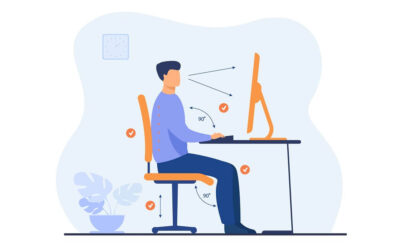
Working from home has changed how we use our bodies, and not always for the better. Long stretches in one position, makeshift desk setups, and far less incidental movement are driving a wave of back pain, neck pain, and repetitive strain problems. The good news is that a handful of simple, evidence-based changes prevent most of it. Here is how to protect yourself.
Why working from home creates pain
Pain from sustained sitting is not really about “bad posture”. It is about load and time. Tissues tolerate load well when it varies, and they complain when load is constant. The kitchen chair you have used for two years is not inherently bad, but eight hours a day in any one position is.
There is a second, often overlooked factor: the movement you have lost. Office life used to build in small bouts of activity throughout the day, such as the walk to the station, the trip to a meeting room, or the walk to grab lunch. Working from home quietly removes most of that. The result is more time still, in fewer positions, with less natural movement to break it up.
The most common working-from-home complaints
Five problems come up again and again with home workers. Lower back pain is the most common, driven by hours of sustained sitting with little variation. Neck pain, often called tech neck, comes from looking down at a laptop or phone for long stretches, which loads the structures at the back of the neck. Shoulder and upper back pain builds from rounded, hunched positions held all day. Wrist and forearm strain develops from typing and mouse use without proper support. And headaches are frequently driven by neck tension and long periods of screen focus.
The encouraging part is that these share the same root causes, so they tend to respond to the same handful of changes rather than five separate fixes.
1. Set the desk up well, but do not obsess
- Top of the screen at or just below eye level.
- Feet flat on the floor, knees and hips around 90 degrees.
- Forearms supported, shoulders relaxed.
- Document holder or second monitor at the same height to avoid neck rotation.
One specific point for laptop users: a laptop forces a compromise, because if the screen is at the right height the keyboard is too high, and if the keyboard is right the screen is too low. The simple fix is to raise the laptop on a stand or a stack of books to bring the screen up, then add a separate keyboard and mouse. It costs very little and removes one of the biggest drivers of tech neck.
2. Move every 30 minutes
The single most effective intervention is also the simplest. Set a timer. Stand up. Walk for 60 to 90 seconds. Reach overhead, rotate your spine, roll your shoulders. Then sit back down. The body needs varied input, so give it a small dose every half hour and you will prevent most desk-related pain. This matters more than any single piece of equipment.
A simple desk-break routine
If you want something concrete to do when the timer goes off, this takes under a minute and targets the areas that suffer most at a desk:
- Standing back extensions: hands on your lower back, gently lean back and look up, 5 times.
- Shoulder rolls: roll the shoulders backwards 10 times to open out a hunched upper back.
- Neck rotations: slowly turn your head fully left and right 5 times each way.
- Chin tucks: draw your chin gently straight back (making a double chin), hold briefly, 5 times, to counter forward-head posture.
- A short walk: to the kitchen and back, ideally with a glass of water so you stay hydrated too.
3. Build strength outside work hours
A body that is conditioned tolerates static postures far better than one that is not. Two to three resistance training sessions per week, focusing on the back, glutes, and shoulders, is one of the best long-term investments you can make in your desk-work resilience. Strong, well-conditioned tissue simply copes with a long day at the desk more comfortably than deconditioned tissue does.
4. Manage your screen time
Looking down at phones and laptops for long periods loads the neck, and doing it for hours adds up. Take breaks from screens at lunchtime, outside if possible, and avoid slouching on the sofa with the laptop in the evening if your work day has already been heavy. Your neck has usually had enough by then.
5. Treat early niggles seriously
Most people wait far too long to address pain, often months. A two to three-week niggle is usually quick to fix. A six-month chronic pattern is much harder. If something has not settled within two weeks, get it assessed rather than hoping it goes away on its own.
The posture myth
It is worth saying clearly: there is no single perfect posture that prevents pain, and sitting rigidly upright all day is not the answer. The best posture is the next one. Bodies are built to move, and the most protective thing you can do is change position often rather than hold any one position, however “correct”, for hours. Take the pressure off getting it perfect and put it into moving more.
How Full Motion Physio can help
The clinic regularly treats home-working patients across Manchester for desk-related back, neck, and shoulder problems. Treatment combines hands-on manual therapy, practical ergonomic advice, and structured strength rehabilitation using elite-level gym equipment on site, so you do not just feel better in the short term, you build the resilience to stay pain-free long term.